How to Warm Up an Email Domain: A Practical Guide
Learn how to warm up an email domain: authenticate your sender, ramp volume gradually, monitor deliverability, and protect your sender reputation.
In this guide
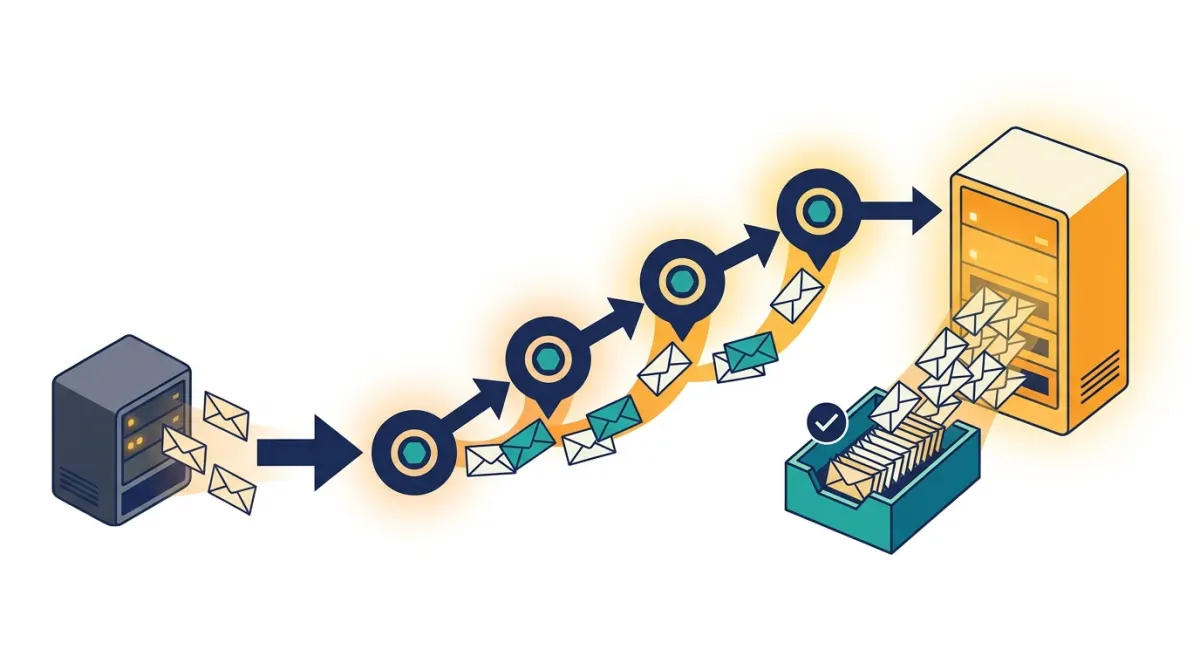
Warming up an email domain means gradually increasing your sending volume and engagement signals so inbox providers learn to trust your domain before you rely on it for real campaigns or transactional traffic. The process typically combines authentication setup, a slow volume ramp starting with your most engaged contacts, and close monitoring of opens, bounces, and spam complaints. Done correctly over several weeks, it protects your sender reputation and keeps future emails out of the spam folder.
What Email Domain Warm-Up Means and Why It Matters
If you are wondering how to warm up an email domain, you are probably about to send from a brand new domain, a new subdomain, or a domain that has been quiet for a while. Inbox providers like Gmail, Outlook, and Yahoo have no sending history for that domain, so they treat it cautiously by default. Domain warm-up is the deliberate process of building a positive sending history so that mailbox providers associate your domain with wanted, engaged mail rather than spam.
Every domain and every sending IP carry their own reputation. A domain reputation reflects how recipients interact with mail sent from that specific domain over time: opens, clicks, replies, deletions without reading, and spam complaints all feed into it. An IP reputation works similarly but is tied to the server infrastructure sending the mail. When you send from a shared sending platform, your domain reputation usually matters more than the IP, since mailbox providers increasingly evaluate senders at the domain level.
It helps to separate two related but distinct ideas. Domain warm-up covers every address at a domain, for example everything sent from yourdomain.com, including marketing, product updates, and transactional mail. Individual mailbox or email warm-up focuses on a single sending address and is often used for cold outreach accounts. For a SaaS founder or an info-product creator sending both campaigns and transactional mail, domain-level warm-up is almost always the relevant process, because your reputation follows the whole domain, not just one inbox.
Skipping warm-up is one of the most common reasons new senders see poor inbox placement in their first weeks. A sudden spike in volume from an unfamiliar domain looks exactly like the pattern of a compromised account or a spam operation, so providers respond by filtering mail into spam or junk, or by throttling delivery altogether.
Prepare Your Domain Before Sending
Before you send a single warm-up email, a few foundational steps make the entire process faster and safer. Rushing past this stage is the easiest way to undermine an otherwise careful warm-up schedule. Once the steps below are done, send one email to a mail tester to confirm everything passes before day one.
Set Up SPF, DKIM, and DMARC
Authentication records tell mailbox providers that mail claiming to come from your domain is actually authorized to do so. SPF lists which servers can send on your domain's behalf, DKIM adds a cryptographic signature to each message, and DMARC tells receiving servers what to do when a message fails those checks and gives you visibility into abuse of your domain. Without these three records correctly published in your DNS, no amount of careful volume ramping will fully offset the trust signal that is missing.
If you plan to send from a subdomain dedicated to marketing or transactional mail, confirm that the same authentication is configured for that subdomain specifically, since inheriting records from the root domain is not always automatic depending on your DNS setup.
Separate Transactional and Marketing Sending
Transactional mail, such as password resets, receipts, and account notifications, behaves very differently from marketing campaigns in terms of expected volume, open rates, and complaint rates. Mixing both on the same sending domain or IP pool can let a rocky marketing campaign drag down the deliverability of critical transactional messages, or the reverse. Many teams choose to send transactional mail through a dedicated path, such as a transactional email API, while keeping marketing campaigns on a separate subdomain. This separation also makes it easier to diagnose problems, since a spike in complaints on one stream will not be masked by healthy metrics on the other.
Clean Your List Before You Start
Warm-up only works if the people you send to actually want your mail. Before ramping volume, remove unverified addresses, obvious typos, and contacts who have not engaged with you in a long time. If you are migrating from another platform, do not import your entire historical list on day one. A smaller, genuinely interested list will produce the open and click signals that convince mailbox providers you are a legitimate sender, while a large, stale list will generate bounces and complaints that work directly against you.
Follow a Safe Domain Warm-Up Process
Once authentication is in place and your list is clean, the actual warm-up process is mostly about discipline: start small, grow gradually, and let engagement guide your pace rather than a fixed calendar.
Start With Your Most Engaged Contacts
Begin by sending only to subscribers who have interacted with you recently, replied to a message, or explicitly opted in through a double opt-in flow. These contacts are the most likely to open and click, which gives mailbox providers early, strong positive signals tied to your new domain. Avoid sending your very first warm-up messages to an entire list, a purchased list, or contacts who signed up a long time ago and may have forgotten you.
Increase Volume Gradually
Resist the temptation to jump straight to full sending volume. Each increase in daily or weekly volume should be modest enough that engagement rates stay stable. If opens drop or bounces rise after an increase, that is a signal to hold at the current volume, or even step back, before pushing further. The goal is a steady upward trend in both volume and positive engagement, not a straight line to your target send rate as fast as possible.
A Sample Warm-Up Schedule
There is no single schedule that fits every sender, since list size, industry, and how long the domain has been inactive all affect the right pace. The table below illustrates the general shape a warm-up ramp should follow, moving from a very narrow, highly engaged audience to your full sending list.
| Phase | Audience | Relative volume | Focus |
|---|---|---|---|
| Phase 1 | Most engaged subscribers only | Very low | Confirm authentication and establish initial positive signals |
| Phase 2 | Engaged subscribers plus recent sign-ups | Low to moderate | Grow volume while watching opens and complaints closely |
| Phase 3 | Broader active list | Moderate to high | Scale toward normal campaign volume |
| Phase 4 | Full list | Target volume | Maintain consistent sending patterns and content quality |
Spread sending across the week rather than sending everything on a single day, and try to keep a consistent cadence from the start. Mailbox providers also look favorably on predictable patterns, so wildly uneven sending between phases can slow down the trust-building process even if your average volume looks reasonable.
For SaaS teams, the warm-up period often overlaps with onboarding emails, trial reminders, and billing notifications, all of which count toward your domain's reputation. Running these flows through an email platform for SaaS that supports both campaigns and automations on the same domain can simplify coordinating warm-up across every type of message you send, since you are managing one reputation rather than several disconnected tools.
Monitor Deliverability and Adjust Your Sending
Warm-up is not a fixed checklist you complete and forget. It is an ongoing feedback loop between what you send and how recipients and mailbox providers respond. Monitoring is what tells you whether to keep increasing volume, hold steady, or pull back.
Metrics to Watch
- Bounce rate: a rising bounce rate usually points to list quality problems rather than a reputation issue, and should be fixed before continuing to increase volume.
- Spam complaints: even a small number of complaints relative to volume can slow or reverse warm-up progress, since complaints carry heavy weight with mailbox providers.
- Open and click rates: consistent engagement is the clearest positive signal, though keep in mind that privacy features on some mail clients can report an open without a genuine read, so treat opens as one signal among several rather than the only one.
- Inbox placement versus spam placement: where possible, check whether your messages land in the primary inbox, a promotions tab, or spam, since this tells you more directly how a given provider currently views your domain.
- Unsubscribe rate: a sudden spike often means content or frequency mismatches expectations set at sign-up, which can indirectly hurt reputation if it drives complaints instead of simple unsubscribes.
Tracking these signals consistently, rather than only glancing at them occasionally, is what turns warm-up from guesswork into a repeatable process. The email deliverability guidance you follow for ongoing sending should be the same discipline you apply during warm-up itself, since the habits you build in these first weeks tend to carry forward.
When to Slow Down or Pause
If bounce rates climb, complaints increase, or you notice mail landing in spam folders at major providers, pause further volume increases immediately. In some cases it is worth temporarily reducing volume back to an earlier, stable phase rather than pushing through. Reputation damage caused by moving too fast is slower to repair than the time saved by skipping steps, so a short pause early in the process is almost always cheaper than recovering from a damaged domain later.
It is also worth remembering that warm-up does not end the moment you reach your target sending volume. Sudden silence after a successful ramp, or an abrupt jump far beyond your established pattern, can itself raise flags with mailbox providers. Keep sending consistently once you reach full volume, and treat any major change, such as a new campaign type or a large list import, as a smaller version of the same gradual approach you used for domain warm-up itself.
Ultimately, learning how to warm up an email domain comes down to patience and attention to engagement signals rather than any single trick. Authenticate properly, separate your sending streams, start with the contacts who already trust you, grow volume in step with positive engagement, and keep monitoring once you reach steady state. Senders who treat warm-up as an ongoing discipline, not a one-time setup task, are the ones who maintain strong inbox placement over the long run.
Frequently asked questions
How long does it take to warm up an email domain?
There is no universal warm-up period because the right pace depends on your sending volume, audience engagement, bounce rate, and mailbox provider feedback. Start with a small, engaged segment and increase volume only when delivery signals remain healthy. A new domain, a rebranded domain, or one that has been inactive may require a more cautious approach than an established domain with consistent sending history.
Can I warm up a domain without an email warm-up tool?
Yes. You can warm up a domain manually by sending to opted-in, engaged recipients, increasing volume gradually, and tracking bounces, complaints, opens, clicks, and placement where available. Use a documented schedule and pause increases when performance worsens. A tool can automate scheduling and reporting, but it cannot replace proper authentication, permission-based data, list hygiene, or relevant email content.
Should I warm up a subdomain separately?
Yes, treat a subdomain as a separate sending stream and establish its reputation gradually, especially when it will handle a different email type such as marketing, transactional, or product messages. Configure authentication for the subdomain and keep its traffic consistent. Mailbox providers may also consider signals connected to the parent domain, so a subdomain does not eliminate the need for responsible sending practices across your domain structure.
What is the difference between domain warm-up and IP warm-up?
Domain warm-up builds a reputation for the domain used in your sender identity and authentication records. IP warm-up builds a reputation for the sending IP address used to deliver mail. These are related but distinct signals. A new dedicated IP may need its own gradual ramp, while senders on shared infrastructure may have less control over IP reputation. Review both your domain and IP setup before increasing volume.
Can I send transactional emails during email domain warm-up?
Yes, but protect transactional traffic by separating it from promotional sending when possible. Use a dedicated subdomain or sending stream, authenticate it correctly, and send only necessary messages to recipients who triggered or requested them. Keep transactional volume predictable and avoid using critical notifications to test large increases. Monitor delivery closely so a problem with promotional traffic does not interfere with important account or service messages.
What should I do if bounces or spam complaints increase during warm-up?
Stop increasing volume and investigate the cause before sending more. Remove hard bounces, suppress repeated soft bounces, and review whether recipients gave permission to receive the messages. Check authentication, sending frequency, content relevance, and list acquisition sources. If complaints remain elevated, reduce or pause the affected stream, correct the underlying issue, and resume only after your audience and delivery signals show improvement.
How do I maintain my email domain reputation after warm-up?
Maintain a predictable sending pattern, keep authentication records accurate, and send only to recipients who have opted in and continue to engage. Remove invalid or persistently inactive addresses, honor unsubscribes promptly, and separate promotional, transactional, and other streams when appropriate. Continue reviewing bounce rates, complaints, engagement, and provider feedback. A successful warm-up is not permanent protection from reputation damage caused by poor sending practices.